Choosing between WordPress vs Wix vs Squarespace is one of the first decisions you make when your small business needs a website. All three can give you a good-looking site. The real differences show up later, when you want to rank on Google, add features, or move your site somewhere else.
We build websites for US small businesses every week, so here is our plain-English comparison for 2026, covering cost, SEO, speed, selling online and support, with an honest pick for each type of business.
WordPress vs Wix vs Squarespace: quick verdict
- Choose WordPress if your website needs to bring in leads from Google, you plan to grow, or you want full ownership of your site.
- Choose Wix if you want to build a simple site yourself this weekend and you are happy to stay on Wix long term.
- Choose Squarespace if you are a photographer, designer, restaurant or creative business and looks matter more than flexibility.
| WordPress | Wix | Squarespace | |
|---|---|---|---|
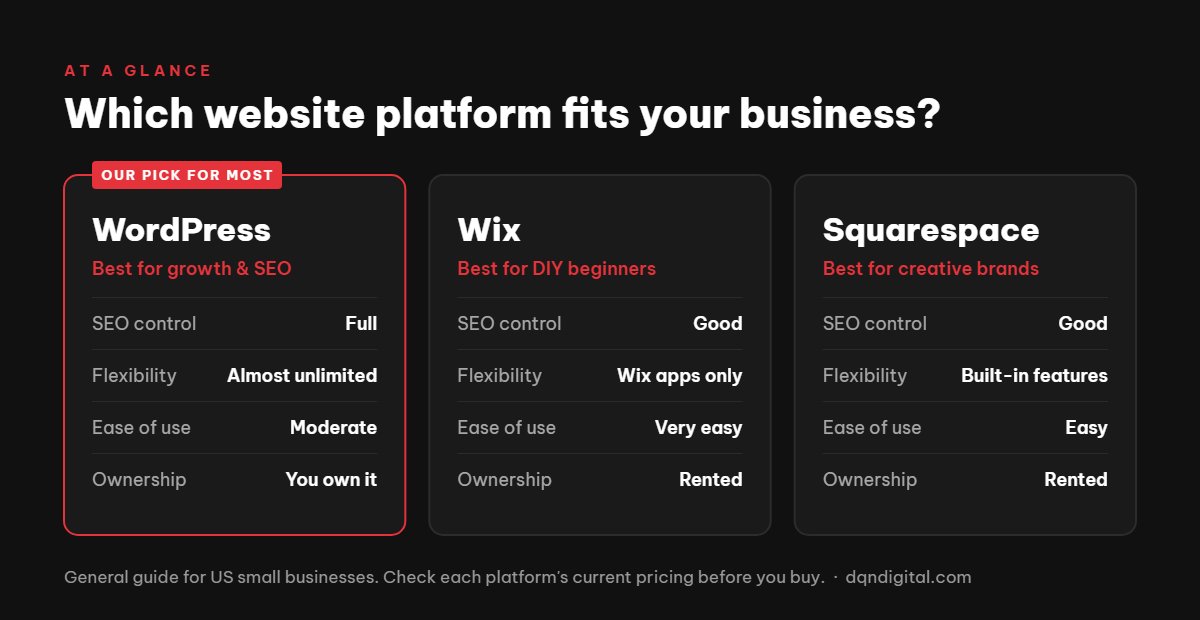
| Best for | Growing businesses, SEO, lead generation | DIY beginners | Creative and visual businesses |
| Ease of use | Moderate | Very easy | Easy |
| SEO control | Full | Good | Good |
| Flexibility | Almost unlimited | Limited to Wix apps | Limited to Squarespace features |
| You own the site | Yes | No (you rent it) | No (you rent it) |
| Easy to move later | Yes | Very hard | Hard |
Cost compared
Cost is often the deciding factor in WordPress vs Wix vs Squarespace. Wix and Squarespace charge a monthly subscription that covers hosting, security and the site builder. Business plans usually land somewhere between roughly $20 and $50 a month, depending on the features you need (online payments, bookings, more storage). Prices change often, so always check the current plan pages before you commit.
WordPress itself is free. You pay for hosting (often $5 to $30 a month for a small business), a domain name, and any premium theme or plugins you choose. If you hire a designer, the build is a one-time cost, and after that your running costs are usually lower than a builder subscription.
The hidden cost to watch with builders is lock-in: you keep paying for as long as the site exists, and if you ever want to leave, you usually have to rebuild from scratch. For a full breakdown of website budgets, read our guide on how much a business website costs in 2026.
SEO compared
For SEO, the WordPress vs Wix vs Squarespace gap is bigger than most people expect. All three platforms let you edit page titles, meta descriptions and URLs, and all three can rank on Google. The difference is how far you can go.
- WordPress gives you full control: SEO plugins like Rank Math or Yoast, schema markup, redirects, site speed tuning, and complete control over your content structure. This is why most serious content and local SEO sites run on WordPress.
- Wix has improved a lot and covers the basics well for a small local business. Advanced technical SEO is more limited.
- Squarespace handles the basics cleanly, but you have fewer options for speed tuning, structured data and advanced settings.
If Google is going to be a main source of customers for you, WordPress gives you the most room to grow. For a practical example, see our guide to custom WordPress web design for US small businesses.
Ease of use
Ease of use is where WordPress vs Wix vs Squarespace differ most for beginners. Wix is the easiest to start with. You drag elements anywhere on the page and see the result instantly. Squarespace is almost as easy, with more structured templates that keep your site looking polished. WordPress has a steeper learning curve, especially for setup, hosting and updates.
That gap shrinks a lot when a professional sets WordPress up for you. A well-built WordPress site lets you update text, prices and images yourself in a few clicks, while someone else handles updates, backups and security.
Speed and performance
Page speed affects both your Google rankings and how many visitors turn into enquiries. Google measures it with Core Web Vitals, which look at loading speed, responsiveness and layout stability.
- WordPress can be the fastest of the three or the slowest. It depends on your hosting, theme and plugins. With good hosting, caching and a lightweight theme, a WordPress site can score very well.
- Wix handles hosting for you and has improved its speed, but you cannot change much under the hood if a page is slow.
- Squarespace sites are usually reasonably fast, but large image-heavy templates can slow things down on mobile.
In short: builders give you an acceptable baseline with no effort, while WordPress gives you the highest ceiling if it is set up properly.
Selling online
If you want to sell products or services online, all three can take payments, but they suit different sizes of store.
- WordPress with WooCommerce suits stores that need custom products, subscriptions, bookings or integrations with other tools. It is free to install, but needs more setup.
- Wix has built-in e-commerce that works well for a small catalogue and is quick to launch.
- Squarespace has clean, attractive product pages and is a good fit for a small boutique or a creative selling prints, classes or digital downloads.
Whichever you choose, compare the transaction fees on each plan, as these can add up quickly once you start selling.
Support, security and maintenance
Wix and Squarespace look after hosting, security and software updates for you, and both offer customer support. This is one of their biggest advantages for owners who do not want to think about the technical side.
WordPress needs regular updates to the core software, theme and plugins, plus backups and basic security. You can do this yourself, use a managed WordPress host, or have an agency look after it. Once that is in place, WordPress is very secure, and it powers a large share of the web.
Templates and design
All three offer professional templates. Squarespace is known for its polished, design-led templates. Wix has a huge library and lets you move anything anywhere, which is flexible but makes it easier to end up with a messy layout. WordPress has thousands of themes, and with a page builder or a custom design you can create almost any layout, so your site does not look like everyone else’s.
A useful rule: if your website mainly needs to look good, a builder template may be enough. If it needs to win customers from search, the structure of the site matters as much as the design.
When to choose each
Here is how we would settle WordPress vs Wix vs Squarespace for different types of business.
Choose WordPress if…
- You want your website to bring in calls and enquiries from Google.
- You plan to add a blog, booking system, store or custom features later.
- You want to own your site and be free to change hosts or designers.
Choose Wix if…
- You are just starting out and want to build a simple site yourself.
- Your site is mostly a digital business card with a few pages.
- You are comfortable staying on one platform for the long term.
Choose Squarespace if…
- Your work is visual: photography, design, interiors, food or events.
- You want beautiful templates with little effort.
- You need a small online store or portfolio, not a complex site.
FAQ
Is WordPress better than Wix for SEO?
For most growing businesses, yes. Wix covers the SEO basics, but WordPress gives you more control over speed, structured data, URLs and content, which matters when you compete for local or national searches.
Can I move my Wix or Squarespace site to WordPress later?
You can move your content, but the design does not transfer. In practice, moving usually means rebuilding the site, so it is worth picking the right platform from the start.
Which is cheapest for a small business?
For the first year, a DIY Wix or Squarespace site is often cheapest. Over several years, a WordPress site usually costs less to run, and you own it outright.
Do I need a developer for WordPress?
Not to edit content, but a professional setup saves a lot of time and avoids common speed and security problems. After launch, you can update most things yourself.
Which platform is best for a local service business?
For plumbers, cleaners, contractors, clinics and similar local businesses, WordPress is usually the best long-term choice because it gives you full control over local SEO, service pages and lead forms. Wix can work for a simple starter site.
Is Squarespace good for SEO?
Squarespace covers the essentials well: clean URLs, editable titles and descriptions, sitemaps and SSL. It offers fewer advanced options than WordPress, so it suits businesses where search is helpful but not the main source of customers.
WordPress vs Wix vs Squarespace: our final take
There is no single winner in the WordPress vs Wix vs Squarespace debate, only the right fit for your goals. We build fast, SEO-ready WordPress websites for US small businesses, and we will tell you honestly if a simpler builder suits you better. See our web design services or get a free quote.